Halloween Costume ideas 2015
Latest Post

Dell's matte-black  at Dell measures 23.6 by means of 17.four with the aid of 21.2 inches (HWD) and weighs a stout eighty five.8 kilos. Getting it from the box to a sturdy table or printer stand calls for  reasonably wholesome people (and/or a hoist). Out of the box, you can connect it most effective via Ethernet or USB cable. to apply 802.11 wi-fi, you will want to buy .ninety nine Dell wi-fi Card from Dell's website online and plug it into the back of the printer.


cell connectivity options include Apple AirPrint, Google Cloud Print, and Mopria, and lacking are wi-fi Direct and close to-area conversation (NFC). The closing two are peer-to-peer protocols that permit you to print from your tablet or smartphone with out either it or the printer being part of a community. just as Canon and some other printer makers have finished lately, Dell has alternatively advanced its own apps, together with Dell file Hub and Dell Open Print driver, for cell connectivity, among different things. normal, mobile tool options are extra than good enough.

The S3845cdn's preferred paper ability is 700 sheets, split among a 550-sheet drawer and a 150-sheet multipurpose tray. If this is no longer sufficient, you can upload any other 550-sheet drawer  to boom ability to one,250 sheets. The 50-sheet automated report feeder (ADF) is single-bypass, which means it could experiment both facets of a web page simultaneously.


safety features abound, consisting of depended on Platform Module (TPM) for information encryption, comfortable Print for assigning PINs to print jobs, a relaxed embedded internet server, OpenManage Printer essentials (OMPE) for fast setup and fleet tracking, or even a lock slot at the paper drawer(s) to prevent tampering. setting up safety, as well as many different walk-up functions (inclusive of making copies, and scanning to and printing from cloud sites, community sites, and USB thumb drives) are handled from a five-inch capacitive contact display, which contains the complete manipulate panel. The handiest  physical buttons are domestic and energy.

Print speed


Dell quotes the S3845cdn at 36 pages in keeping with minute (ppm) in simplex (one-sided) mode, in either black-and-white or color, and 24ppm in duplex (double-sided) mode. To provide you with those scores, printer makers generally use gently formatted text files with about five percentage coverage at the page. trying out from laptop Labs' Intel center i5, windows 10 .ninety nine at Microsoft testbed computer, I used a similar (MS word) text file and timed the S3845cdn at 33.3ppm duplex and 34.7ppm simplex.

as it's nearly 10ppm faster than Dell's 24ppm score, the duplex wide variety is higher than anticipated right here, but I ran the documents numerous instances to ensure. in any case, when I brought greater complicated documents containing snap shots and photos to the combination, the S38545cdn slowed down to thirteen.7ppm duplex and 15.3ppm simplex, which is about proper—normally, when we add our photos- and picture-weighted down business documents the performance hit is 50 percentage or greater.

Output satisfactory


among this AIO's higher attributes are its print and duplicate great. (but then what do you count on for   textual content ranging in length from four to upwards of 100 points came out crisp and extraordinarily legible, very near typesetter excellent. Our enterprise pics (charts, graphs, tables), PowerPoint slides, and Excel charts and spreadsheets all came out searching sharp and expert, displaying simplest occasional, minor flaws. as an example, like the HP OfficeJet seasoned 8210 Printer and the Canon Maxify MB5120 wi-fi domestic office Inkjet Printer.ninety nine at Amazon, it produced a few minor banding in dark fills and gradients.


pictures appeared right, too, for a laser printer. A photo-centric inkjet inclusive of the less expensive Canon Pixma MG7720 seventy nine.95 at B&H picture-Video-seasoned Audio, will print better pics nevertheless, but the S3845cdn's are exact sufficient for most business packages. For the maximum part, all the S3845cdn's output on our checks, inclusive of scanning and copying, turned into somewhat above common.
strolling expenses

A  printer with an eighty,000-web page most month-to-month responsibility cycle (and a advocated obligation cycle of two,000 to 6,000 pages) requires a low value in keeping with page. The S3845cdn's running prices are a number of the lowest we have seen for a color laser AIO. the very best yield black toner cartridge sells and is right for approximately eleven,000 prints, while the 3 color cartridges (cyan, magenta, and yellow) go for  each and, while mixed with the black toner, yield approximately 9,000 pages. the usage of those numbers, the strolling costs come to 1.4 cents consistent with black-and-white page and 8.nine cents according to colour web page.

again, those numbers are surprisingly aggressive for a coloration laser. for instance, the aforementioned ProXpress C3060FM's walking fees are 2.4 cents according to monochrome web page and 13.five according to colour page. understand that with a 1-cent difference in the monochrome cost in step with page, each 10,000 pages you print with the Samsung model will value you an additional , and every a hundred,000 pages will fee —enough to buy any other printer (or a entire set of high-yield toner cartridges).
conclusion

there may be little to dislike approximately the Dell shade smart Multifunction Printer S3845cdn. It prints exceedingly rapid and well. It has low going for walks expenses for a shade laser AIO, so even though its purchase charge is lofty in comparison with that of the Samsung ProXpress C3060FM, if you churn out lots of pages, you may make up the distinction in a be counted of months. because of its exceptional stability of satisfactory and cost, the S3845cdn is our new Editors' choice for medium-to-heavy duty micro and small workplace AIOs.

wireless printers and all-in-one printers (AIOs) have become not unusual in each homes and small offices, and many larger agencies are adopting them as well. wireless connectivity affords extra flexibility in in which you positioned your printer, helps you to effortlessly print from cellular devices, and offers you one fewer ugly cable to fear approximately or journey over.


despite the fact that wireless printers were available for approximately a decade, it is handiest within the past several years that they have come into their personal. most domestic printers have wi-fi functionality, a lot of them eschewing wired networking for it, though a few have each wireless and Ethernet. Many enterprise inkjets also include wireless enabled, and we are seeing more lasers with either fashionable or non-compulsory wi-fi as properly. (non-compulsory wireless can price everywhere from , so make certain to aspect that into the price.)

more recent wireless printers provide mobile printing help. you can print from an iPhone or an iPad thru Apple's AirPrint to well matched printers. Mopria-certified printers can print directly from Android gadgets, and lots of printer producers and 0.33 events provide apps for printing from iOS, Android, and different devices. Many without delay help printing from cloud-based services.


A small, but quickly growing, wide variety of printers rent wireless Direct (or its equivalent), a generation that has the ability to substantially simplify wireless connectivity. wireless Direct-enabled computers and printers can effortlessly connect to every different over an instantaneous, peer-to-peer connection without requiring a wireless get entry to factor. A newer and even greater direct wireless printing approach is close to area communique (NFC), wherein one has best to touch a well matched mobile device to an NFC-enabled printer for printing to commence.

One element it's held people returned from buying wi-fi printers is the perception that they may take a success in velocity. it truly is from time to time authentic—plenty relies upon on the specifics of your wireless versus stressed out networks—however any time lost in information switch is commonly minimum in comparison with the entire print time, specifically if the printer is well located with recognize in your router. If speed is a situation, select a wi-fi printer that still comes with Ethernet, simply in case. (All printers will at the least offer USB 2.0 connectivity.)

Is an inkjet for your future? you can find the generation in a large form of printers and MFPs designed to fill a wide type of roles at domestic or at the office. here, we're going to explore the exceptional sorts of inkjets, and spotlight a few key functions to look for when looking for one.

understand Your Inkjets
With such a lot of fashions to pick out from, it is beneficial to determine simply what you need to do with the printer earlier than you start shopping.

some inkjets are intended for home use, a few are aimed toward offices, and others are properly for twin use in a home and home office. several models are made to output nothing however photos, and are perfect for printing out snapshots immediately, at the same time as others print textual content and snap shots as properly, and also excel at producing gallery-worthy prints.

The so-referred to as near-committed photo printers are extensively used by expert photographers, artists trying to output high-stop paintings, and novice photograph fans alike. There are even inkjets designed for cellular printing, entire with batteries. maximum home inkjets are meant for non-public printing or, at maximum, shared fashions for outputting some pages per day. They tend to be compact, and the extensive majority of them are small sufficient to share a table with.

snap shots and textual content pleasant
you could assume nearly any inkjet to print pix good enough for both inner enterprise use (like printing PowerPoint handouts) and home obligations (like producing birthday celebration invitations). in case you pick cautiously, you can have output nice that might please a photo artist.

The Achilles' heel for inkjets is textual content quality. Ink tends to bleed into undeniable paper, which makes it difficult to print textual content with the absolutely expert look you'll want for documents like a résumé or a enterprise notion. no longer pretty, inkjets supposed for the office normally do better on this score than domestic-oriented fashions, but we've but to look an inkjet that prints text with the crisp, easy edges and smear-evidence ink you'll get from any laser printer. Worse, most inks will smear in case you spill something on them or strive the usage of a highlighter.

That said, maximum inkjets at the least can print textual content at a nice it really is perfectly exceptional for most ordinary output. And despite the fact that it could now not be smooth to discover an inkjet with stellar text great, there are some of them out there.


Some models support Wi-Fi Direct (or its equivalent) and/or near-field communication (NFC), both of which allow for direct peer-to-peer connection between the printer and a compatible device without the need of a network. In the case of NFC, the connection is made simply by touching the device to a certain spot on, or even bringing it into close proximity to, the printer. For the best picks, check out our favorite Wi-Fi printers.


responsibility Cycles and Paper capability
whilst the majority of inkjet printers may be found in particular in a home or a home workplace, inkjet technology is displaying up in increasingly enterprise-oriented models meant for heavier-obligation printing, consisting of excessive-quit ones that could rival laser printers in velocity. They tend to do that with the aid of the use of print heads that run the entire width of a web page. although their maximum month-to-month obligation cycles nonetheless fall brief of heavy-obligation lasers, higher-cease inkjets are nonetheless able to dealing with the printing desires (and, within the case of MFPs, copying, scanning, and faxing as properly) of many workgroups and small places of work.

still, many inkjets don't actually have a posted obligation cycle, and for those who do, the scores are typically laughably low as compared with lasers, often measured in a few thousand pages over the life of the printer. The maximum paper capability in inkjets is frequently as low as 100 sheets, and infrequently extra than three hundred, besides in the case of higher-give up workplace fashions. if your printing wishes are strictly mild-responsibility, a finances model with a low paper capability need to suffice.

Inkjets for the office
office-orientated inkjets encompass the few unmarried-function printers and MFPs designed for especially heavy-obligation printing, as well as people who have office-centric functions. as an example, they could paintings as standalone fax machines; fax at once out of your pc's difficult pressure; and experiment to email easily, using your computer's electronic mail program and mechanically including the test as an attachment.

office MFPs upload an automated report feeder (ADF) for easy scanning, faxing, and copying of multipage files. a few ADFs can test both facets of a web page. of those, duplexing scanners, which test each facets of a page immediately, are a whole lot quicker than fashions with duplexing or reversing ADFs ( names for the identical issue), which experiment one aspect, turn the page over, after which experiment the alternative.

workplace MFPs typically provide paper capacities of 200 sheets or greater. must you want to print -sided files, you may need a model with an automobile-duplexer. Get a model with two paper trays in case you want the capacity to print with  sorts or size of paper while not having to remove and replace the paper each time you are making a transfer. some workplace inkjets aid printing at as much as tabloid length, letting you get all those spreadsheet columns onto a unmarried page.


Brother DCP-J562DW printer assessment

A compact and versatile domestic printer, but marred via Brother’s high-priced inks and going for walks fees. We evaluation the Brother DCP-J562DW. also see: quality printers 2016.

additionally see: excellent Black Friday Printer offers
Brother DCP-J562DW evaluate: fee and uk availability

you could buy the Brother DCP-J562DW direct from Brother . store round online and you'll discover it less expensive, even though. The Brother expenses simply £eighty five.
Brother DCP-J562DW evaluation: build and design

Brother’s new DCP-J562DW is a compact inkjet printer that is nicely perfect for use at home, however its high running charges may additionally make you suspect twice earlier than buying. See all printer reviews.

The design of the DCP-J562DW is quite appealing, measuring simply 40cm wide, 15cm and three.5cm deep, so it’ll match without problems onto a desk or a nearby shelf in case you’re a bit tight for space at home. even so, it nevertheless manages to suit in a scanner and copier, in conjunction with two separate trays in an effort to keep one hundred sheets of A4 paper and 20-sheets of picture-paper. There’s additionally a guide feed behind the printer for envelopes or other kinds of paper. The DCP-J562DW provides both USB and wifi connectivity, at the side of -sided (duplex) printing, and also supports Apple’s AirPrint for iOS gadgets, and Google Cloud Print for far flung printing over the internet.
Brother DCP-J562DW review: Print first-rate and performance..


Print nice is a piece of a blended bag, even though. undeniable text printing is very good, with smooth, finely distinct characters, and the DCP-J562DW managed a pace of 9.five pages in keeping with minute in our mono printing exams, which isn’t in any respect bad for a printer costing about £100.00. also see Printing guide.

coloration printing is a bit slower, at around three.5ppm, however the first-class is flawlessly adequate for displays and other kinds of graphics files. however, photo printing became a touch disappointing, even if the usage of outstanding sleek image paper. The DCP-J562DW turned out a 4x6 postcard print in a speedy 25 seconds, however our prints lacked comparison and the colors seemed a touch useless. We’ve visible better photo output from many rival printers in this rate variety.
Brother DCP-J562DW overview: running prices

Our largest concern, even though, is with the printer’s jogging expenses. the first aspect we noticed when putting in the DCP-J562DW become that the manual factors out that the starter cartridges furnished with the printer have best 80% of the potential of the standard size replacement cartridges, which means that that it received’t be too long before you need to stump up for some new cartridges. the usual black ink cartridges fee a hefty   .seventy nine and simplest last for 260 pages, which comes to more than 6p in line with page. The XL size black cartridges double the yield to around 550 pages, however keeping with cartridge that also works out at about 4p in line with web page, that's properly above common for an inkjet printer.

colour printing is pricey too. the same old cyan, magenta, and yellow cartridges cost £nine.59 every -  .seventy seven for all 3 collectively – and with the equal 260-page yield as the black cartridges that involves 11p consistent with web page. happily the XL colour cartridges are a piece greater cheap  each and a potential of 550 pages. That brings the fee down to approximately 7.5p consistent with web page for coloration, which is in the direction of the average for inkjet printers, but Brother’s claim that the DCP-J562DW presents “our lowest ever ink prices” doesn’t encourage confidence. incidentally, we additionally observed that a multi-% containing all 4 fashionable ink cartridges virtually costs 3p more than shopping for the cartridges in my opinion, so Brother definitely needs to have a chunk of a think about those ink costs.


We just like the compact layout of the Brother DCP-J562DW, and its print fine for textual content and photographs is ideal for a printer in this fee range. however, picture output will be better and the steeply-priced ink cartridges will sting you in the long run. opponents such as Epson and HP have achieved plenty currently to lessen the jogging charges for his or her printers, so Brother wishes to do greater to preserve up with innovations consisting of Epson’s high-potential Ecotank printers or HP’s on the spot Ink subscription scheme.

Presentation


The OnePlus 3T comes only five months after the dispatch of the OnePlus 3. Why so soon?

Basic: OnePlus got the more current and all the more capable Snapdragon 821 framework chip and heard clients' protestations about the not all that good battery life on the OnePlus 3, and it accepted the open door to enhance these two key parts of the experience.


Alongside those changes, it expanded the value: the OnePlus 3T 64GB model expenses  than the OnePlus 3 with a similar measure of capacity. There is additionally another, 128 gig choice for the OnePlus 3T for $480. Yes, this is marginally more costly than some time recently, yet when you contrast it with telephones with comparable equipment and screen measure like the Google Pixel XL, the OnePlus 3T is still almost a large portion of their cost.

Specs, be that as it may, don't educate us much concerning the genuine encounter of utilizing the OnePlus 3T: that is the reason we've been utilizing the telephone over the previous week to let you know how great of a gadget it is. Go along with us underneath for the full OnePlus 3T audit.

Plan

Same refined, premium plan as the OnePlus 3, the pre-connected screen defender is a pleasant touch.

 As far as its physical outline, the OnePlus 3T is precisely the same as the OnePlus 3: same frame, same thickness, all to a degree that ensures that OnePlus 3 cases fit the 3T flawlessly.

There is one thing changed in the outwards appearance, however, and that is shading: the new 3T highlights a darker, "gunmetal" dim that looks incredible. The old light silver shade of the OnePlus 3 is no more drawn out accessible. There is additionally a moment, delicate gold shading alternative, however that one is just accessible on the 64GB OnePlus 3T and is in exceptionally restricted supply.

Much the same as the OnePlus 3, the 3T accompanies a pre-connected screen defender ideal out of the crate: and simply like before it's excessively restricted, not covering the full width of the screen, and when you utilize it you continually feel its sharp edge meddle with the generally smooth glass surface. Yes, this is a minor thing, yet you can't resist the urge to notice it. OnePlus is likewise offering a superior, full-width  screen defender on its official site, and we prescribe considering getting one.

At that point, there is the quiet switch. It's a to a great degree advantageous seemingly insignificant detail that we've come to acknowledge increasingly. We wish more telephones had it.

Alongside the dispatch of the 3T, the organization additionally brings a discretionary, independently bought new case: a black wood alternative that looks incredible. This conveys it to a sum of six cases made by OnePlus itself: there's the mark sandstone one, a bamboo one, a karbon one, and in addition a couple of wooden cases. While they are not intended to shield from overwhelming drops, they make a phenomenal showing with regards to with being light and a la mode, and additionally shielding from scratches.


Display

Great display: you can choose between the default vivid color mode and sRGB mode, which is for those who want accurate colors.


The OnePlus 3T highlights a 5.5-inch Super AMOLED with a determination of 1080 x 1920 pixels. Furthermore, it looks incredible.

Some may be worried about sharpness: yes, it's not as sharp as Quad HD screens, but rather the distinction is difficult to see, in actuality, and you truly need to take a gander at the screen from exceptionally up near notice it's not as sharp. It's a non-issue.

Regarding hues, the default setting of the screen is for clear hues that pop comfortable, whites are a bit on the blue side, keeping in mind in fact the hues are not exceptionally very much aligned, this is the regular default AMOLED look that numerous clients like.

Fortunately, it's by all account not the only choice: numerous clients, including photography experts and other people who tend to precise instead of great shading, would incline toward the sRGB shading standard. You can change to it effectively: go into Settings > Display > Screen Calibration, and select the sRGB choice. We've gauged the telephone in this mode too, and it is exceptionally all around adjusted, with extremely exact hues. Attempt both shading modes and pick the one you like more, we have a tendency to go for sRGB.

We likewise discover the screen is not very intelligent and is agreeable and simple to peruse outside.

Presentation 


The Lenovo Phab2 Pro is not only your normal cell phone. Also, no, we're not alluding to the tremendous show as a characterizing highlight. It's the primary telephone to accompany Google's Tango stage and it's likewise one of the main telephones Lenovo is propelling in the US under its own particular image.

So what is Tango? Basically - a window into another level of increased reality. Because of a variety of camera sensors and whirligig data, the telephone can precisely track its own position in every one of the three measurements. This permits it to precisely show increased reality (AR) components laid over the live bolster from the camera viewfinder. It's a hodgepodge of AR and VR and Google is wagering on it as the innovation without bounds.


Lenovo Phab2 Pro audit

Lenovo is a mainstream tablet maker who assumed control over IBM's PC business . Be that as it may, not everyone knows them for making cell phones - at any rate not in the US. In any case, they are and attempting to imitate the fruitful IBM bargain, they obtained Motorola's portable business . Yes, the Moto Z and the Moto Z Force are both made after the Lenovo/Moto arrangement was fixed so they are the main taste of Lenovo's desire in the fragment.

The Phab2 and the Phab2 Pro are distinctive in the away that they are the main gadgets to turn out in the US under the Lenovo mark. Specs aside, the Phab2 is less expensive than the Phab2 Pro. It doesn't have a unique mark scanner or the Tango camera setup, however it offers the same tremendous 6.4-inch screen-sized telephone


Key elements

6.4" QHD IPS LCD Display

Android Marshmallow 6.0.1 with Lenovo's UI changes

Qualcomm Snapdragon 652 CPU (Built for Tango): (4 X 1.8GHz Cortex-A72 and 4 X 1.4GHz Cortex-A53), Adreno 510 GPU, 4GB of RAM

Google Tango camera setup: 16MP camera with PDAF and f/2.0, confront recognition, and HDR/Depth sensor/IR camera and emitter/Video - 1080p @ 30fps

8MP front-confronting camera, f/2.2, 1.4 micron pixel estimate, 1080p video

64GB of inward stockpiling, expandable through microSD

Feline. 7 LTE (300/100 Mbps); Wi-Fi a/b/g/n/air conditioning, double band; Wi-Fi Direct; Bluetooth 4.0 - A2DP; GPS/GLONASS; microUSB v2.0

Inward 4,050 mAh battery; Fast charging solutin (24W)

Capacitive catches, raise mounted unique mark scanner, 3.5mm earphone jack

Dolby Atmos sound upgrade/Dolby Audio Capture 5.1

Fundamental inadequacies

The decision of Snapdragon 652 raises a few eyebrows

May not fit in a pocket, very muscular and top-overwhelming

Tango usefulness and the UI feel unpolished

Not the latest Android OS form

No 4K video recording despite the fact that the chipset underpins it


Tango is the thing that ties the Phab2 Pro all together, and the dependence on outsiders to consistently revive and add to the list of utilizations is critical for the accomplishment of the Lenovo telephone, also Tango, Google's infant.

Presentation


The Lenovo Phab2 Pro is not only your normal cell phone. What's more, no, we're not alluding to the immense show as a characterizing highlight. It's the main telephone to accompany Google's Tango stage and it's likewise one of the primary telephones Lenovo is propelling in the US under its own image.


So what is Tango? Basically - a window into another level of increased reality. On account of a variety of camera sensors and gyrator data, the telephone can precisely track its own position in every one of the three measurements. This permits it to precisely show increased reality (AR) components laid over the live nourish from the camera viewfinder. It's a mess of AR and VR and Google is wagering on it as the innovation without bounds.

Lenovo Phab2 Pro audit 


Lenovo is a prevalent tablet producer who assumed control over IBM's PC business in 2005. However, not everyone knows them for making cell phones - at any rate not in the US. Be that as it may, they are and attempting to imitate the effective IBM bargain, they gained Motorola's versatile business in 2014. Yes, the Moto Z and the Moto Z Force are both made after the Lenovo/Moto arrangement was fixed so they are the primary taste of Lenovo's aspirations in the portion.

The Phab2 and the Phab2 Pro are diverse in the away that they are the main gadgets to turn out in the US under the Lenovo mark. Specs aside, the Phab2 is $299 less expensive than the Phab2 Pro. It doesn't have a unique mark scanner or the Tango camera setup, however it offers the same gigantic 6.4-inch screen-sized telephone for $199.

Which conveys us to the cost of the Phab2 Pro: $499. Lenovo valued this cell phone sensibly for a first-cycle item from another stage by Google. It will let those keen on the Tango stage to make buzz with collaborators and relatives, and the reasonable $499 value point additionally offers a prudent purchase into the innovation.

Key elements

>6.4" QHD IPS LCD Display

>Android Marshmallow 6.0.1 with Lenovo's UI changes

>Qualcomm Snapdragon 652 CPU (Built for Tango): (4 X 1.8GHz Cortex-A72 and 4 X 1.4GHz Cortex-A53), Adreno 510 GPU, 4GB of RAM

>Google Tango camera setup: 16MP camera with PDAF and f/2.0, confront recognition, and HDR/Depth sensor/IR camera and emitter/Video - 1080p @ 30fps

>8MP front-confronting camera, f/2.2, 1.4 micron pixel measure, 1080p video

>64GB of inward stockpiling, expandable by means of microSD

>Feline. 7 LTE (300/100 Mbps); Wi-Fi a/b/g/n/air conditioning, double band; Wi-Fi Direct; Bluetooth 4.0 - A2DP; GPS/GLONASS; microUSB v2.0

>Inward 4,050 mAh battery; Fast charging solutin (24W)

>Capacitive catches, raise mounted unique mark scanner, 3.5mm earphone jack

>Dolby Atmos sound upgrade/Dolby Audio Capture 5.1

>Fundamental weaknesses
>The decision of Snapdragon 652 raises a few eyebrows

>May not fit in a pocket, very meaty and top-substantial

>Tango usefulness and the UI feel unpolished

>Not the latest Android OS adaptation

>No 4K video recording despite the fact that the chipset bolsters it

Tango is the thing that ties the Phab2 Pro all together, and the dependence on outsiders to consistently revive and add to the list of utilizations is critical for the accomplishment of the Lenovo telephone, also Tango, Google's child.


Presentation

The HTC Desire  Lifestyle is a mid-run Android cell phone that is not for everybody. While it has its professionals, there are all that could possibly be needed cons to overload it.

The handset isn't accessible in the US, however European clients can get it for around $300, which makes it more costly than the vast majority of its rivals. We'll give you a chance to choose for yourself if the cost is justified, despite all the trouble. All in all, how about we get straight into it, should we?

In the case:

HTC Desire 10 Lifestyle

USB to Micro-USB link

Divider charger

Greetings res sound earphones

Wrist strap

Different booklets

Design


Presentation

The HTC Desire 10 Lifestyle is a mid-extend Android cell phone that is not for everybody. While it has its masters, there are all that anyone could need cons to burden it.

The handset isn't accessible in the US, yet European clients can get it for around , which makes it more costly than the vast majority of its rivals. We'll give you a chance to choose for yourself if the cost is justified, despite all the trouble. All in all, how about we get straight into it, might we?

In the container:

HTC Desire 10 Lifestyle

USB to Micro-USB link

Divider charger

Hello res sound earphones

Wrist strap

Different booklets

Display

It comes as no surprise that such a cheap mid-ranger would come with a cheap mid-range display. And this is exactly the case here.


The Desire 10 Lifestyle highlights a 5.5" LCD screen, with a determination of 720x1280 pixels. This makes for a pixel thickness of 267 ppi, which is adequate for perusing the web or perusing ebooks.

With regards to hues, you have a decision. The HTC Desire 10 Lifestyle offers a shading temperature slider in its settings, which gives you a chance to alter how cool or warm you need your hues to be. As a matter of course the show is to some degree cool, be that as it may.

Seeing points presumably introduce the greatest trade off in the show division, as visuals get somewhat washed out when seen at medium to wide edges.

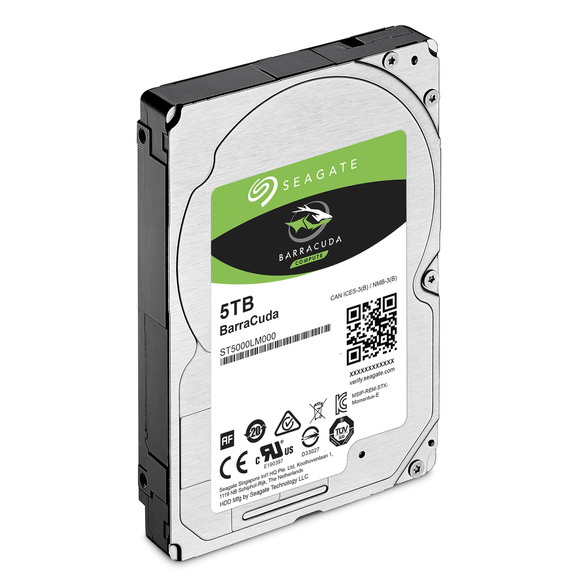
tough drives would possibly take a back seat to SSD's in terms of intercourse attraction, however in terms of area on the reasonably-priced, Seagate’s BarraCuda line will turn heads.

Seagate on Tuesday announced  new BarraCuda drives—one of which now holds the document for being the largest-capability 2.5-inch power.

The BarraCuda ST5000 pushes the capacity restriction from the previous 4TB to 5TB, and   Seagate says the pressure uses the agency’s 1TB-in step with-platter design that it unveiled at CES in January 2016. The identical force is likewise available in 4TB and 3TB fashions.

All are five,400rpm drives with 128MB of cache and a two-year assurance. energy intake is rated at 2.1 watts below load and 1.1 watts even as idle.

before you remember putting any such in your pc, recognise that the 5TB, 4TB, and 3TB BarraCuda drives are 15mm thick. while they might squeeze into a few large gaming laptops, their number one target is superthin all-in-ones that can’t accommodate significant 3.5-inch computing device drives.

Seagate additionally introduced a brand new five,400rpm BarraCuda ST2000LM015 power that conforms to the smaller 7mm wellknown used by many laptops. unfortunately, that force doesn’t circulate the ball any further down the field, maxing out at 2TB.

That’s one area where hard power makers appear to be dropping to SSD makers, which don’t ought to deal with as many mechanical limitations. Samsung, in truth, holds the report for the largest consumer SATA force with its 4TB 850 Evo SSD that suits right into a 7mm case. 


Why this subjects: humans say tough drives are useless but if for folks who want to get the maximum potential for the least amount of money, they’re nonetheless very a good deal alive.

HP's injected a little hot hardware into the stylish Envy 13 laptop and Envy 27 display announced Tuesday night. You'll find the latest CPU from Intel in the former, and in the latter, 4K resolution and support for AMD’s FreeSync technology. 

HP Envy 13-inch laptop

 Pricing on the brand new Envy will start  shelves on October 26. although lots of its improvements are incremental, the number one highlight is the twin-core 2.5GHz Intel center i5-7200U seventh-generation Kaby Lake mobile processor, paired with Intel’s HD 620 incorporated photos, 8GB of RAM, and a 256GB PCIe NVMe M.2 SSD. For ports, the Envy 13 comes with one USB 3.1 kind-C port, two USB three.1 Gen 1 ports (which basically approach they’re wellknown USB 3.0), and HDMI. The computer leans on 802.11ac wireless and Bluetooth 4.2 for wi-fi connectivity.

the alternative spotlight: HP says the new Envy 13 boasts a 14-hour battery life. a fast-charging features boosts stated battery from depleted to 90 percent in about 90 minutes.

The story behind the story: On paper, the upcoming HP Envy thirteen-ab016nr is evolutionary as opposed to progressive, packing hardware that’s kind of similar to the HP Envy thirteen-d040nr you could buy proper now. The older Envy notebook also has the equal amount of RAM, a 256GB m.2 SSD, and a 2.5GHz dual-core core processor. The older computer, however, has a 3200-by way of-1800 decision display, and 3 USB three.zero ports—lacking the USB 3.1 that the brand new Envy has, let alone the Kaby Lake CPU.
HP Envy 27 show
hp envy 27 display frontleft envy

HP’s new 4K Envy display could make an older laptop unexpectedly "appearance" loads better.

HP’s Envy 27-inch IPS display functions 3840x2160 resolution at 60Hz and scrumptious 178-degree viewing angles. It’s also FreeSync-like minded for stutter-unfastened gaming overall performance whilst paired with AMD Radeon photographs playing cards.

Connectivity-smart, the Envy 27 display rocks  HDMI retailers—one is HDMI 2.0 and one HDMI 1.four—and the DisplayPort 1.2 connection that’s important for FreeSync aid. On top of that, you’ll discover a USB-C port with a energy transport functionality of as much as 60 watts. you recognize, if you want to use your reveal to charge your cellphone.
if you need the Envy 27, you’ll have to wait a piece. HP says it won’t move on sale till December four. charges of the brand new reveal will start .ninety nine.


This gaming computer is designed to cope with virtual fact video games. Palicomp has pulled out all of the stops and the i5 Matrix turns in some wonderful performance results, though it’s not with out its troubles. See additionally: great gaming chairs
Palicomp i5 Matrix evaluate: rate

you could purchase the i5 Matrix for £1199.99 inc VAT from Palicomp. That consists of a 27in Asus monitor, plus a mouse and keyboard.

in case you most effective need the computer base unit, the charge drops to £1074.99.

word: considering Palicomp sent us the i5 Matrix, nVidia has launched the GTX 1080 and 1070. you may specify this sort of snap shots cards while ordering.
Palicomp i5 Matrix review: overall performance

by way of pushing the Intel core i5-6600K from 3.5GHz all of the way up to 4.7GHz, Palicomp has attempted by means of some distance the most bold overclock we've got seen with this CPU. we will’t blame it for trying, in any case performing on the pinnacle of the performance charts always appears precise and it’s positive to capture any reader’s attention.The computer additionally comes fitted with an nVidia GeForce GTX 980 pix card, that is a big step up from the bottom spec of a GTX 970, ensuing in incredibly better gaming performance across the board.

It’s additionally certainly one of 3 systems in our group take a look at to gain a ‘Very excessive’ VR first-rate rating from the SteamVR overall performance test. With an average VR quality score of 9.1, it benchmarks well ahead of challengers from Chillblast, Overclockers and Zoostorm, however not as rapid as either the Wired2Fire Diablo Predator VR or the Yoyotech Warbird RS14, both of which use the faster GeForce 980 Ti photographs card.

What this indicates us is that Palicomp’s overclocking hasn’t boosted backside-line gaming overall performance what may be completed on the equal fee with inventory processor speeds and a faster portraits card. just decreasing the velocity a notch or two might, in our opinion, make this a higher laptop. Of course this could range from CPU to CPU, but our overview sample both had to run a little slower or to be equipped with a good extra effective cooling system.

unluckily, there are aspect effects to pushing the CPU all the manner to four.7GHz and these come in the form of the demands placed on energy consumption and cooling. whilst we first powered up the i5 Matrix, we noticed that CPU temperatures have been far too excessive. Palicomp, to its credit, identified a broken processor cooler and quickly shipped out a substitute to which changed into slightly upgraded in specification as in step with our concept.


With the new cooler in area, CPU temperatures had been saved an awful lot lower, but under complete load nonetheless climbed as excessive as 100Cº. You’d be impossible to look this happen under ordinary use but we would had been happier with a much less formidable overclock together with some a great deal decrease temperatures.

The Mesh hurricane PCA packs a quad-middle processor and a powerful pix card right into a noticeably-ready gaming computer, however now not with out slicing a few corners. See additionally: exceptional gaming computers


without a doubt named after your favored tech recommendation-based totally website, the Mesh hurricane PCA will attraction to people who need the maximum gaming body prices for the minimum financial outlay, and for £699 you do get masses of gaming bang in your spending dollar.
functions and layout

based on an Intel core i5-6500 walking at up to 3.6GHz, paired with an Asus Nvidia Geforce GTX 1060, the pc has masses of power in reserve for even stressful gaming titles. The gadget additionally comes with 8GB of 2400MHz DDR4 reminiscence and a roomy 1TB difficult drive.

those are all set up to an Asus B150M pro GAMING motherboard which comes with up-rated LAN and sound competencies geared toward game enthusiasts and Asus’s AI Suite three management software.

The motherboard leaves some improve ability too: simplest one of the board’s 4 reminiscence slots is populated making it simpler to boom reminiscence in case you need it and there are plenty of unfastened SATA ports available as well as an M.2 socket for connecting a PCI express SSD.

unluckily, the typhoon PCA comes and not using a SSD as wellknown and that is likely the most important sacrifice which has been made so that it will hold charges down. Booting up a current pc with out an SSD looks like stepping lower back in time. It won’t have an effect on your gaming performance, but it's going to affect loading times and it does make the whole gadget sense alternatively gradual and unresponsive out of doors of gaming. fortuitously, as cited above, there’s lots of scope for adding one later whilst price range permit.

The Nvidia GTX 1060 is widely recognized for its wonderful gaming overall performance, but the model used right here is the much less-powerful 3GB model, which not best has half of the reminiscence of the unique 6GB model, however additionally a less effective images processor. This doesn’t quantity to a huge difference in exercise, however it’s sincerely some thing to be privy to.

The gadget is housed in a CiT storm black ATX case, fitted with a crimson LED fan. It’s a conventional-style tower case with masses of spare pressure bays, cable control and a hinged plastic door at the the front, hiding the (unused) optical force bays. you furthermore may get a pair of USB ports on the pinnacle. layout-clever it’s in reality a gamer’s case, with its ‘Transformers’ style the front facia and obvious facet panel, via which the unusual white shrouding of the snap shots card may be visible, alongside a Be Quiet natural Rock narrow compact CPU cooler.
performance

The Nvidia GeForce GTX 1060 used here can provide strong gaming overall performance, typically within the equal ballpark as the pricier 6GB model despite the fact that manifestly a little slower. It’s also less proper to running the highest excellent settings on the very maximum resolutions, including 4K, due to the decrease amount of reminiscence. In wellknown, gaming at 1440p goes to be wonderful at very high or extremely high-quality.

VR performance is also robust, accomplishing a ‘excessive’ rating from the Steam VR overall performance test, and a ‘awesome’ score from the VRMark Orange benchmark which locations is without difficulty above what you’ll want to play cutting-edge VR titles. The Be Quiet CPU cooler also did a excellent job, maintaining temperatures down to a maximum of 57C underneath full load.

MKRdezign

Contact Form

Name

Email *

Message *

Powered by Blogger.
Javascript DisablePlease Enable Javascript To See All Widget